Asphalt plant control software — the plant works in the field, and so should its software.
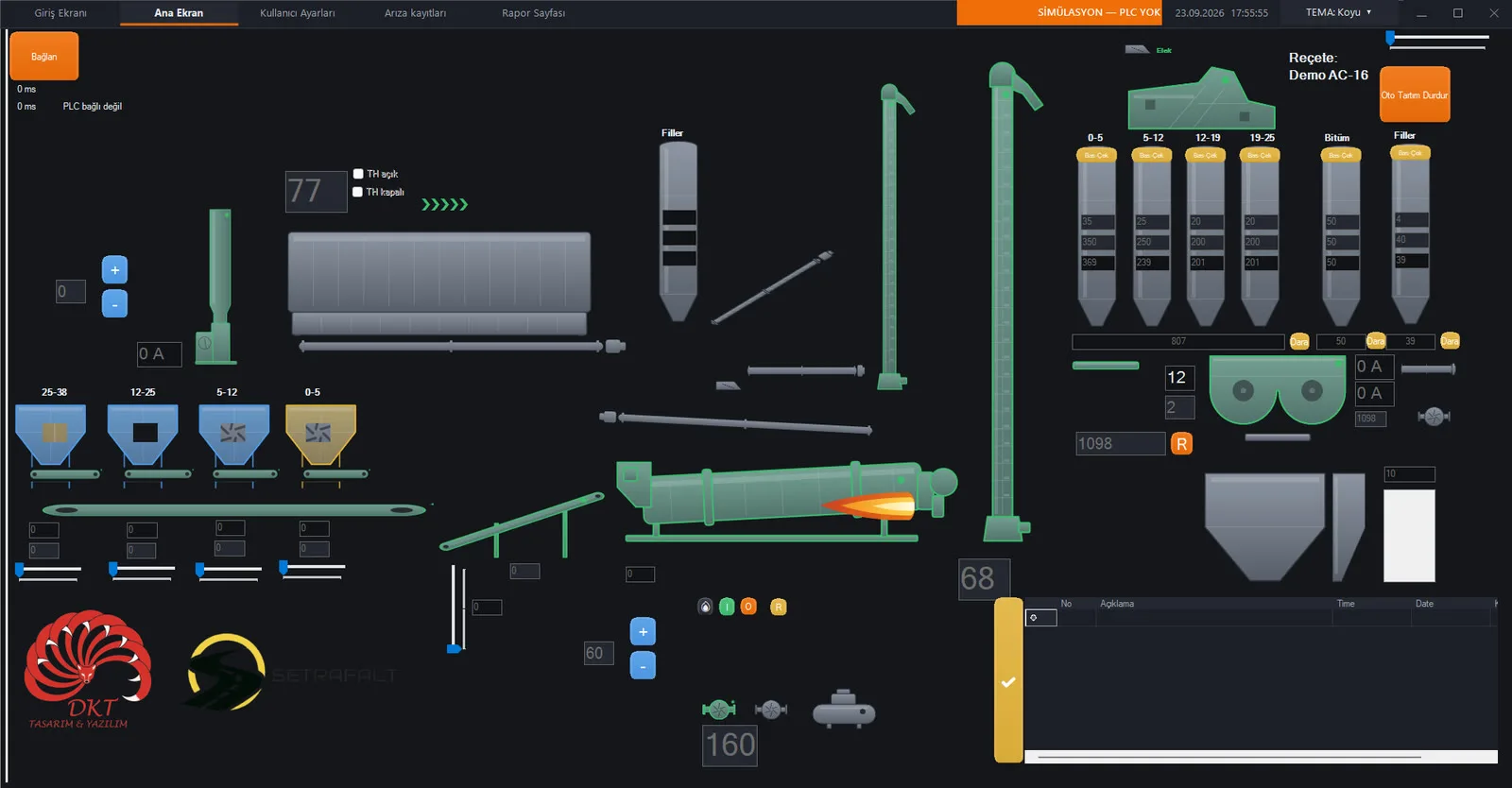
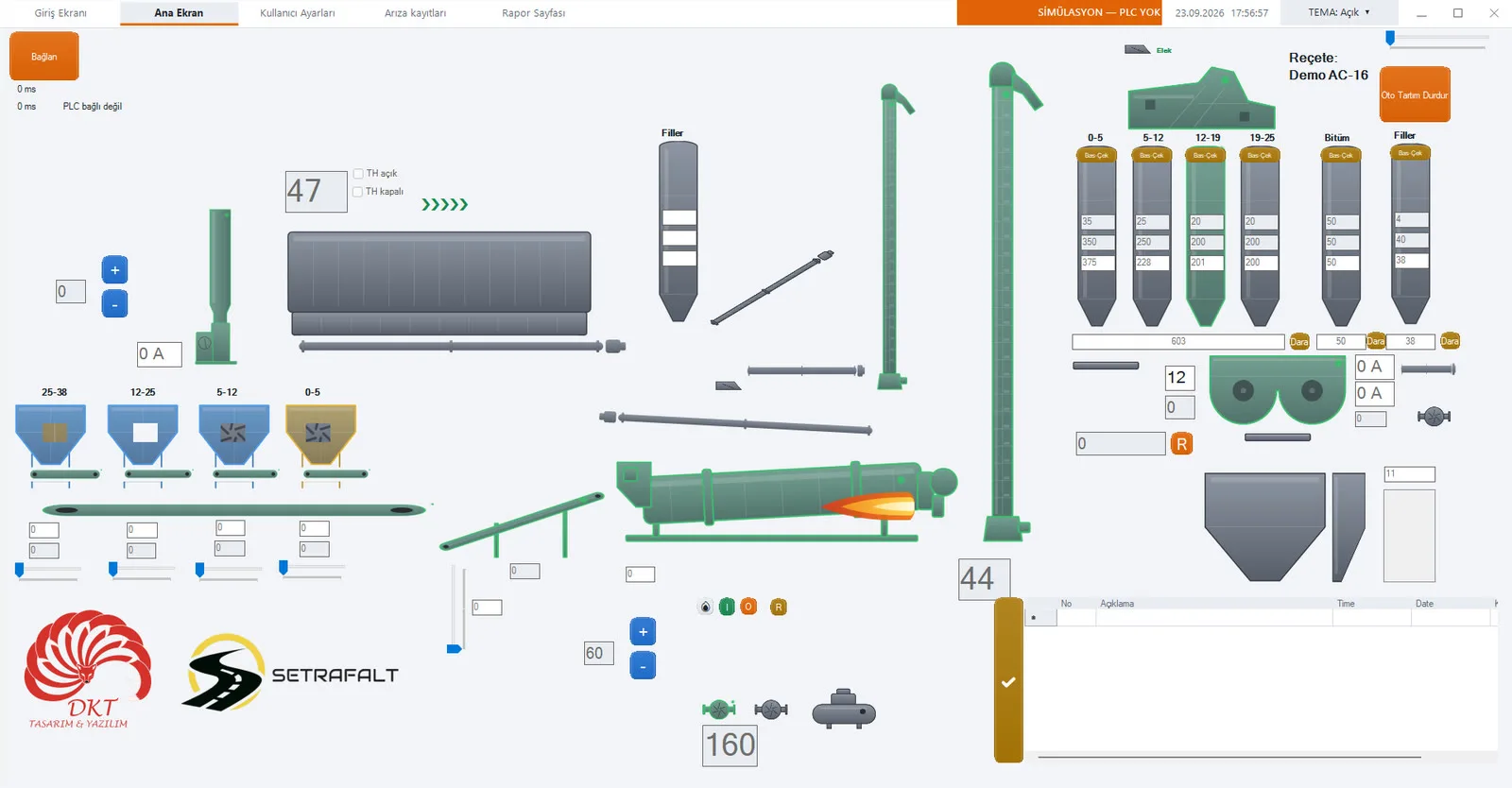
DKT APlants is PC-based control software that runs the entire asphalt plant from one screen: from the cold feed bins to the burner, from the screen to the bitumen scale, and the exhaust and baghouse line. It works with a Delta PLC over Modbus TCP and is running on an operating plant.
Running in simulation
Sound familiar?
“The burner stopped again and nobody knows why.”
If the screen does not show which motor tripped and which equipment stopped because it depends on it, fault-finding takes hours.
“The operator mixed up the sequence and the belt stayed full.”
If the start sequence is left to the operator’s memory, sooner or later the plant will be started in the wrong order.
“The power went out — where did production stop?”
With plant software that keeps no records, nobody knows exactly what was produced after an outage.
What is asphalt plant automation?
Asphalt plant automation means running all the equipment in the plant — from aggregate dosing to the dryer drum, from the burner to bitumen weighing, from the mixer to the dust collection line — from a single control point according to set rules. On site the PLC reads the inputs and outputs, while the asphalt plant software on the PC gives the operator the plant’s mimic screen, recipes and fault information.
On site this software is sometimes called asphalt plant program, sometimes plant control software; they all describe the same job: making the control room PC talk to the plant’s PLC. DKT APlants does this with a Delta PLC over Modbus TCP. We use the same approach on the concrete side — for concrete batching plant automation see DKT CPlants.
The whole plant on one screen
Dosing and automatic weighing
Separate dosing control for the 0-5, 5-12, 12-19 and 19-38 fractions; aggregate, filler and bitumen are weighed automatically according to the recipe. Empty-bin signals appear on screen, so production never runs out of material unnoticed.
Burner and dryer
The burner servo is modulated open/close, the flame signal is supervised and burner faults are reset from the screen. The dryer, high-pressure pump and fuel return pump are managed in the same chain.
Exhaust and baghouse filter
Exhaust fan, exhaust damper, fresh-air damper and jet-pulse cleaning valves are controlled from the software. The filter cleaning carriage and robot fan are on the same screen — the draught balance is not left to the operator alone.
Bitumen line
Circulation pump forward/reverse, three-way filling valve and scale discharge pump run in sequence. The bitumen scale is filled to the recipe quantity and discharged into the mixer.
Thermal fault management
Mixer, dryer, elevator, screen, belts, pumps, vibrators, feeder motors — every motor’s thermal fault input is monitored separately. When a fault occurs the related outputs stop, the faulty equipment turns red, equipment stopped because it depends on it turns orange, and the siren sounds.
Machine priority system
A machine cannot start before the machine it depends on. No gate opens before the belt runs, no burner ignites before the fan runs. The operator does not have to memorise the sequence.
Screenshots
The mimic screen is drawn as vectors and stays sharp at any resolution. Equipment state is shown by colour: grey stopped, yellow waiting for command, green running, red fault. The operator can switch between a dark theme for the control room and a light theme for the office and presentations with one click.
Why this software?
Low installation cost
The panel and field equipment are not touched. Only the software between the control room PC and the PLC changes.
Easy to use
Press equipment on the mimic screen to run it. Colours have one meaning each: grey stopped, yellow waiting for command, green running, red fault.
Keeps running
If the power fails, the session is recovered on start-up and production is followed from where it stopped. Events and faults are written to a log.
How does it work?
1. Send your IO list
The plant’s input/output list and PLC type are enough. We work out compatibility from this list together.
2. The IO map is prepared
No addresses are hard-coded in the program; all connections are defined in a file. When the plant changes, the file changes — not the code.
3. Commissioning on site
Outputs are tested one by one, scales and the burner chain are checked. Operators are trained and a manual is delivered.
Who is it for?
Asphalt plant operator
Renew old plant software that is unsupported or no longer sufficient — without touching the panel.
Automation company
Don’t write dosing, burner and priority logic from scratch. Change the IO map and we adapt it to your project.
Plant manufacturer
Control software you can deliver with the plants you build, with screen layout and branding adapted to you.
Technical summary
| Communication | Modbus TCP |
| PLC | Delta DVP-SE, Delta AS228R |
| IO map | Read from a file — the plant changes, the code doesn’t |
| Dosing | 0-5, 5-12, 12-19, 19-38 fractions |
| Weighing | Aggregate, filler, bitumen |
| Heating line | Dryer, burner servo, flame supervision, fuel pumps |
| Dust collection | Exhaust fan, exhaust and fresh-air dampers, jet-pulse cleaning, robot fan |
| Protection | Motor-level thermal faults, machine priority sequence, siren |
| Operating system | Windows 10/11 |
| Records | Production record, event log, session recovery |
| Interface | Turkish, touch-friendly (other languages on request) |
Asphalt plant automation guides
- Asphalt plant weighing system: aggregate, filler and bitumen
- Burner control and dryer drum automation
- Cold feed and dosing automation
- Baghouse filter and exhaust fan automation
- Automation retrofit without touching the panel
- PLC connection with Modbus TCP
- Türkçe: DKT APlants asfalt plenti otomasyon yazılımı
Relocating your plant?
If the plant is moving to a new site, or a second-hand plant you bought needs to be installed, we work with our partner Setrafalt for dismantling, transport and installation. While the plant is being installed at its new site, we commission the automation — so the plant is ready to produce in one go.
Frequently asked questions
Will it work with my plant?
It works directly with a Delta PLC that speaks Modbus TCP. Send us the plant’s input/output list and we will work out compatibility together.
Do I need to change the panel?
No. Field wiring and the panel stay as they are; what changes is the PC software that talks to the PLC.
I’m an automation company — can I use it in my own project?
Yes. The software is adapted per project: IO map, screen layout and branding are changed to suit your project. Let’s talk.
Is training and support included?
Operators are trained during commissioning, a manual is delivered and remote support is provided.
Are “asphalt plant program” and “asphalt plant control software” the same thing?
Yes, on site both describe the same thing: software running on the control room PC that runs the plant through the PLC. DKT APlants brings dosing, drying, the bitumen line and dust collection together in one program.
I use a different PLC brand — will it work?
The software is designed to work with PLCs that support Modbus TCP and is currently running with Delta DVP-SE and Delta AS228R. If your plant has a different PLC, send us the IO list and PLC model and we will look at the driver side together.
Support for my old plant software has ended — what can I do?
If the plant itself is sound, most of the time only the software needs renewing. Field wiring and the panel stay in place; send us the IO list and we will plan the migration together.
Are production and fault records kept?
Yes. A production record and an event log are kept, and every fault is logged with the equipment and time it occurred. After a power failure the session is recovered on start-up.
Send us your plant’s IO list.
We’ll work out compatibility, set up the screen for your plant and show it to you.